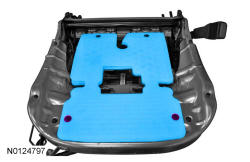
Occupant Classification System (OCS) Sensor: Removal
NOTE:
To prevent system failure, carry out the OCS reset when a front passenger seat cushion is disassembled, a new trim cover is installed or an OCS service kit is installed. Use scan tool to carry out the OCS reset command.
NOTE:
Do not install a new cushion heater mat on the front passenger seat cushion, it is not serviceable separately. If a new cushion heater mat is needed on the front passenger seat, install an OCS service kit equipped with a heater mat. Failure to follow this instruction may result in incorrect operation of the OCS.
- 1.
Remove the front seat backrest. REFER to Seating - 1st Row .- For power seats, raise the seat up to its highest point of travel before seat removal.
- 3.NOTE: Using excessive force when bending the bracket can damage the OCS sensor housing.
Separate the OCS sensor from the bracket in the following sequence.
- Slide an appropriate tool in the slot between the OCS sensor and bracket.
- Carefully lift the tool end to bend the bracket tab and slide the OCS sensor off the bracket.
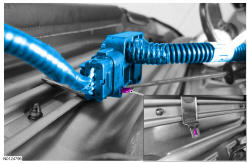
- 5.
Detach the cushion cover retainers attached to the seat track/cushion frame.- If equipped with an OE OCS, remove the cushion foam pad and cushion cover.
- 6.NOTE: OE OCS shown in illustration, service kit similar.
Detach the OCS front pin-type retainers, lift the assembly and feed the hose and sensor out from between the seat cushion support wires.