Occupant Classification System (OCS) Sensor: Installation
- 2.NOTE: Inspect the OCS bladder, seat cushion pan and support assembly for any foreign objects before installing the OCS to the seat cushion pan. Remove any foreign objects found. Failure to follow these instructions may result in incorrect operation of the OCS and may cause system failure.NOTE: Route the OCS components through the correct seat cushion support opening. Failure to follow these instructions may result in component damage and/or system failure.
Route the OCS sensor/module, hose and heater mat pigtail (if equipped) through the seat cushion support wires.
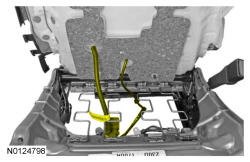
- 4.
Position the cushion foam pad on the seat track and attach the cushion cover J-clips to the seat track.- If equipped with manual lumbar, do not attach the cushion cover along the outboard side of the seat track.
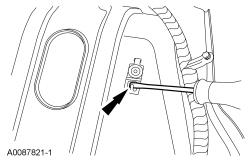
- 6.
Slide the OCS sensor onto the bracket and connect the electrical connector.- Make sure the sensor is secure after installation.
- 8.
Install the front seat backrest. REFER to Seating - 1st Row .
- 9.
Repower the SRS.Do not prove out the SRS at this time. Refer to Supplemental Restraint System (SRS) Depowering and Repowering - With Intelligent Access (IA) or Refer to Supplemental Restraint System (SRS) Depowering and Repowering - Without Intelligent Access (IA) .
- 10.WARNING: Occupant Classification System (OCS) parts are calibrated as an assembly and must only be replaced in the configuration they are sold. Never separate parts of an assembly. Failure to follow this instruction may result in incorrect operation of the passenger airbag and increases the risk of serious personal injury or death in a crash.WARNING: Make sure the front passenger seat repair is complete, the seat and all attached components (head restraint, seat side shield, etc.) are correctly assembled, and the seat is correctly installed to the vehicle before using System Reset to rezero the seat weight. Failure to follow these instructions may result in incorrect operation of the occupant classification system (OCS) and increases the risk of serious personal injury or death in a crash.NOTE: To prevent system failure, take the following precautions before carrying out the OCS system reset:
- Make sure the voltage to the OCSM is greater than 8 volts and less than 18 volts.
- Make sure the OCS is not below 6°C (42.8°F) or above 36°C (96.7°F) when initiating the OCS reset process. If the vehicle has been exposed to extreme cold or hot temperatures, the vehicle must be exposed and kept at a temperature between 6°C (42.8°F) to 36°C (96.7°F) for a minimum of 30 minutes.
- Make sure nothing is present on the passenger seat before and during the OCS reset process.
- Prior to carrying out the OCS reset, make sure a minimum of 8 seconds has elapsed after cycling the ignition switch on.
Using a scan tool, carry out the OCS reset.
- 11.
If the first system reset attempt was unsuccessful, carry out a thorough visual inspection of the following and repair any concerns found.- OCS connector and wiring for damage
- Pressure sensor hose for kinks and/or damage
- Seat-related wiring harness and body wiring harness terminals and connectors for damage
- 12.NOTE: Cycle the ignition switch after the OCS reset.
Carry out a second OCS reset. If the second attempt is unsuccessful, install a new OCS service kit.
- 13.
Prove out the SRS : Turn the ignition from ON to OFF. Wait 10 seconds, then turn the ignition back to ON and monitor the air bag warning indicator with the air bag modules installed. The air bag warning indicator illuminates continuously for approximately 6 seconds and then turns off. If a SRS fault is present, the air bag warning indicator will:- fail to light.
- remain lit continuously.
- flash.
- The flashing might not occur until approximately 30 seconds after the ignition has been turned from OFF to ON. This is the time required for the RCM to complete the testing of the SRS. If the air bag warning indicator is inoperative and a SRS fault exists, a chime sounds in a pattern of 5 sets of 5 beeps. If this occurs, diagnose and repair the air bag warning indicator and any SRS faults.