Passive Anti-Theft System (PATS) - With Intelligent Access (IA): Notes
Component Location
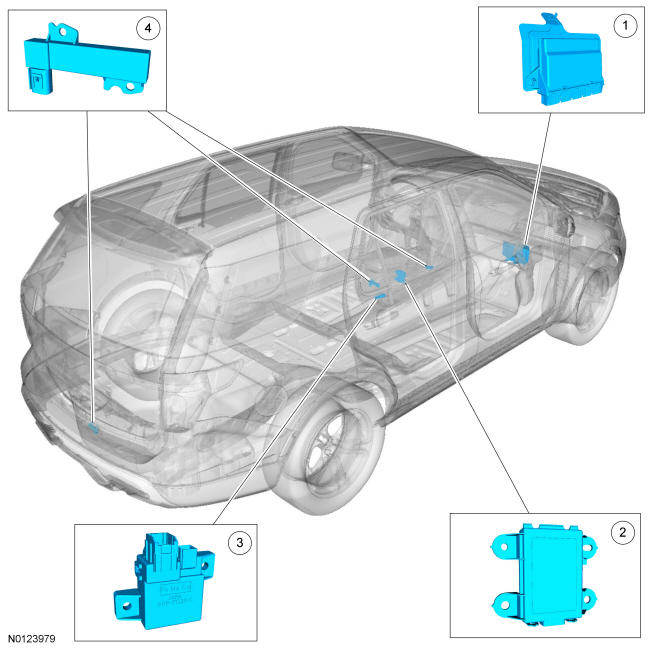
| Item | Description |
|---|---|
| 1 | RFA Module |
| 2 | Passive Start Backup Transceiver |
| 3 | TPM |
| 4 | Passive Start Antennas (3 required) |
Overview
PATS protects the vehicle from theft by preventing the ignition from turning on or the engine from starting unless a programmed Intelligent Access (IA) key is detected inside the vehicle. PATS cannot disable an already running engine.
System Operation
System Diagram
Network Message Chart BCM Network Message Chart
| Broadcast Message | Originating Module | Message Purpose |
|---|---|---|
| Passive entry control data | RFA module | Provide the BCM with the Intelligent Access (IA) key data. The data contains information such as if an Intelligent Access (IA) key has been detected, how many were detected, and if it is a programmed key. It also contains the RFA module ID which is checked by the BCM. |
| Passive entry_fob number | RFA module | Provide the BCM with which specific programmed Intelligent Access (IA) key was used. |
RFA Module Network Message Chart
| Broadcast Message | Originating Module | Message Purpose |
|---|---|---|
| Passive entry target data | BCM | Provide the RFA module with a request for Intelligent Access (IA) key data and also the RFA module ID. Once the RFA module receives this message it responds back to the BCM with the data. |
| Door ajar status | BCM | Used by the RFA module to determine if it should search the interior of the vehicle for an Intelligent Access (IA) key. It searches for a key if any door or liftgate is opened and then closed. |
PCM Network Message Chart
| Broadcast Message | Originating Module | Message Purpose |
|---|---|---|
| PATS start request target 1 | BCM | A request to check the PCM ID. |
Passive Anti-Theft System (PATS)
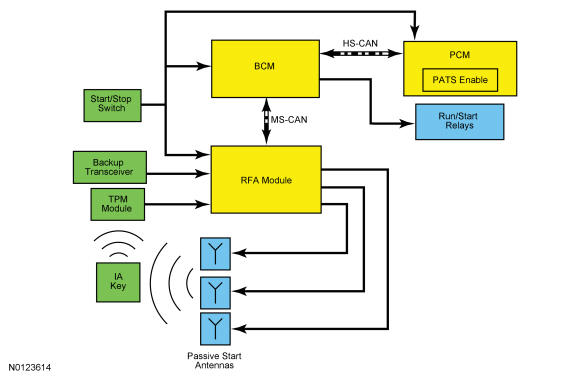
The PATS function is controlled by the RFA module, BCM, and PCM.
When the start/stop switch is pressed, the RFA module initiates the key initialization sequence by activating the 3 interior passive start antennas. Each passive start antenna transmits a low frequency signal approximately 1 m (3 ft) radius of each antenna. If an Intelligent Access (IA) key is within range of 1 of the 3 interior passive start antennas, the Intelligent Access (IA) key is activated. Once the Intelligent Access (IA) key is activated, it sends the PATS identification code to the TPM module via a high frequency signal. The TPM module interprets the high frequency signal from the Intelligent Access (IA) key and sends the information to the RFA module over a dedicated network. If the RFA module determines that a programmed Intelligent Access (IA) key is inside the vehicle, it communicates with the BCM over the MS-CAN and allows the ignition to be transitioned out of off. When the ignition is turned on and the modules initialize, the RFA module, BCM, and the PCM exchange their identifications over the MS-CAN and HS-CAN. If each of the modules receive the correct identification from each other, PATS is enabled and allows the engine to start. If PATS disables the engine from starting, STARTING SYSTEM FAULT is displayed in the message center and a DTC is stored in one of the 3 modules.
PATS and the RKE system share the operation of several components including the Intelligent Access (IA) key and the TPM module. If there is a concern with either of these components, both PATS and the RKE system are affected. REFER to Handles, Locks, Latches and Entry Systems With Intelligent Access (IA) for information on the RKE and Intelligent Access (IA) features.
The RFA module in conjunction with the BCM controls the ignition modes and in conjunction with the PCM controls the starting system.
PATS PIDs
In conjunction with DTCs, the PATS PIDs are a useful tool when diagnosing PATS concerns.BCM PIDs
| Acronym | Name | Description |
|---|---|---|
| PCM_ID | PCM ID Status Stored | Indicates if there is a PCM identification currently stored in the BCM. Must read stored for the engine to start. |
| PCM_VERIFY | PCM Verify OK | Indicates if the module identification check between the BCM and the PCM passes. Must read yes for the engine to start. |
| START_ENABLD | Vehicle Enable Status | Indicates if PATS allows the engine to start. Must read enabled for the engine to start. |
RFA Module PIDs
| Acronym | Name | Description |
|---|---|---|
| BCM_ID | BCM ID Status Stored | Indicates if there is a BCM identification currently stored in the RFA module. Must read stored for the engine to start. |
| BCM_VFY | BCM Verify OK | Indicates if the module identification check between the BCM and the RFA module passes. Must read yes for the engine to start. |
| MASTERKEY | Master Key Present | Indicates if the RFA module detects a programmed Intelligent Access (IA) key in the vehicle. Must read stored for the engine to start. |
| MIN_KEYS | Minimum Number Of Keys Required | Minimum number of programmed keys required. This PID always reads 2. |
| N_KEYCODE | Number Of Programmed Remote Keys | .Number of keys currently programmed into the RFA module. |
| PATSENABL | PATS System Status - Enable Status | Indicates if PATS allows the engine to start. Must read enabled for the engine to start. |
Backup Starting
The vehicle can experience a PATS no start if there is a failure of any passive start antenna, the battery in the Intelligent Access (IA) key, or the TPM module and results in the NO KEY DETECTED message displayed in the message center when the start/stop switch is pressed. However, in the event of one of these failures, the Intelligent Access (IA) key can be placed in the backup slot to allow the vehicle to start. The Intelligent Access (IA) key should be placed in the backup slot with the buttons facing outwards and the key ring up. If a programmed Intelligent Access (IA) key is in the backup slot when the backup transceiver is activated, it activates the Intelligent Access (IA) key and the identification code is sent back to the RFA module. The backup slot is located in the front center of the floor console.
No Key Detected Message
There are 2 scenarios in which the No Key Detected message displays in the message center.
The first is when the ignition is off, the START/STOP button is pressed and a programmed Intelligent Access (IA) key is not detected inside the vehicle. If a component failure (such as a dead Intelligent Access (IA) key battery) is causing the No Key Detected message to display, the backup starting method can be used.
The second scenario is when the vehicle is running, the driver exits the vehicle with the programmed Intelligent Access (IA) key and closes the door.
The RFA module activates all 3 passive start antennas to search the inside of the vehicle for an Intelligent Access (IA) key any time a door or the luggage compartment lid is opened and then closed with the vehicle running. The Key outside car message displays in the message center and the horn chirps twice when the ignition is on and an Intelligent Access (IA) key is no longer detected inside the vehicle.
This strategy deters the Intelligent Access (IA) key from being separated from an already running vehicle. If the Intelligent Access (IA) key is no longer in the vehicle, the ignition remains on and the vehicle continues to operate. When the START/STOP button is pressed to turn the ignition off, the ignition can be restarted without an Intelligent Access (IA) key present inside the vehicle for approximately 10 seconds. After 10 seconds have elapsed, a programmed Intelligent Access (IA) key must be present to transition the ignition out of off. If the driver door is opened during the 10-second countdown, a programmed Intelligent Access (IA) key is needed to transition the ignition out of off.
Automatic Engine Idle Shutdown
The automatic engine idle shutdown feature monitors the state of the vehicle to determine when the engine is powered with no user interaction for an extended period of time. When this condition is detected, a message displays in the message center to inform the operator a vehicle shutdown is imminent. This includes shutting down the engine and turning the ignition off. When the shutdown occurs, press the brake and START/STOP button to restart the vehicle.
The conditions required to begin the automatic engine idle shutdown feature are:
- engine running
- brake pedal not pressed
- accelerator pedal not pressed
- remote start not active
- transmission in P (park) or N (neutral)
- diagnostic scan tool not connected to the vehicle
Once these conditions are met, a time-out starts. When the time-out period ends and none of the listed conditions changed, the automatic engine idle shutdown event occurs.