Engine Oil Replacement Reminder Reset - Procedure 14
The message center is used to program/configure various options. The message center display is located in the instrument cluster.
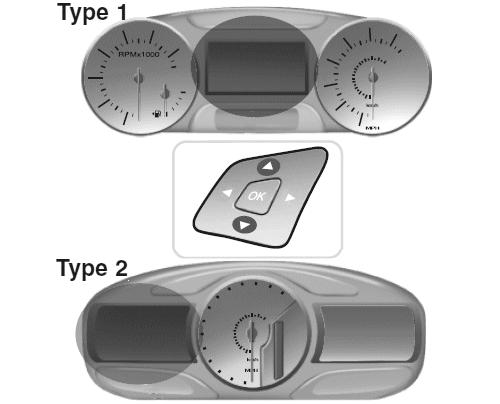
Use the left steering wheel controls to navigate through the message center to locate the Oil Life Reset option. Depending on display type, follow menu path to reset: (see Fig 1)
NOTE:
For Fusion, MKS, MKT, MKX, MKZ
, use Type 2 instructions.
- Type 1 (center display): Main Menu > Settings > Convenience > Oil Life Reset
- Type 2 (left-of-center display): Main Menu > Settings > Vehicle > Oil Life Reset
Press the up/down arrow buttons to move up/down through the message center choices.
Press the left/right arrow buttons to move left/right through the message center choices.
- Press the left/right, up/down arrow buttons to move through the message center choices. Select SETTINGS
- Press the left/right, up/down arrow buttons to move through the message center choices. Select CONVENIENCE or VEHICLE MAINTENANCE
- Press the left/right, up/down arrow buttons to move through the message center choices. Select OIL LIFE RESET
- Press the left/right, up/down arrow buttons to move through the message center choices. Select Percentage - 100, 90, 80, 70, 60, 50, 40, 30, 20, or 10.
- Press the OK button to select highlighted options and confirm choices/messages.