Path 1
The message center is used to program/configure various options. The message center display is located in the instrument cluster.
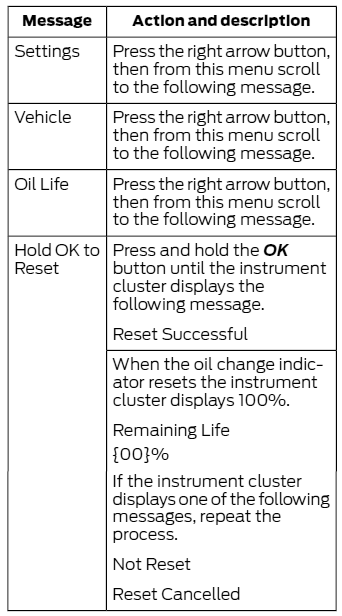
Use the left steering wheel controls to navigate through the message center to locate the Oil Life Reset option: Main Menu > Settings > Convenience > Oil Life > Hold OK To Reset .
- Press the RIGHT ARROW button to move through the message center choices. Select SETTINGS
- Press the RIGHT ARROW button to move through the message center choices. Select VEHICLE or Vehicle Maintenance .
- Press the RIGHT ARROW button to move through the message center choices. Select OIL LIFE
- Press the RIGHT ARROW button to move through the message center choices. Select HOLD OK TO RESET , or press and hold the OK button until the system reset confirmation appears.
- Press the OK button to select highlighted options and confirm choices/messages.
NOTE:
When the oil change indicator resets, the instrument cluster displays 100%. Remaining Life {00}%. If the instrument cluster displays one of the following messages, repeat the process. "Not Reset" or "Reset Cancelled".