Lane Departure Warning: Notes
Overview
The lane keeping alert detects unintentional drifting toward the outside of the lane and alerts the driver to stay in the lane through the EPAS system and IPC display. The lane keeping aid assists the driver by steering the vehicle towards the center of the lane. The system automatically detects and tracks the road lane markings using a camera that is mounted behind the interior rear view mirror.
System Operation
System Diagram
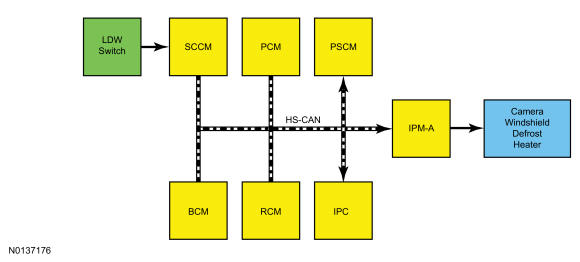
Network Message Chart
Module Network Input Messages - IPM-A
| Broadcast Message | Originating Module | Message Purpose |
|---|---|---|
| Ambient air temperature | PCM | The ambient air temperature is used for camera windshield defrost heater operation. The IPM-A may command the camera windshield defrost heater on below 5°C (41°F). |
| Hands off status | PSCM | Data used to send a message to the IPC when a hands-off condition was detected after lane keeping aid activation. |
| HUD flash rate | HUD module | Suppresses LDW when there is a collision avoidance message. |
| Ignition key type | BCM | Prevents the system from being disabled when a MyKey® key is in use. |
| Ignition status | BCM | Enables the IPM-A. |
| Lane Departure Warning (LDW) switch status | SCCM | Turns the LDW system on and off. |
| Personalization mode intensity/sensitivity | IPC | Message contains the personalized set-up for the LDW. |
| Restraint impact event status | RCM | Suppresses LDW in the event of a restraint system activation. |
| Transmission in reverse | PCM | Suppresses LDW when the transmission is in reverse. |
| Turn signal status | SCCM | Suppresses LDW on the side of a turn signal activation. |
| Vehicle yaw rate | RCM | Suppresses LDW in the event that a loss of vehicle control is detected. |
| Vehicle lateral and longitudinal acceleration | RCM | Suppresses LDW in the event that a loss of vehicle control is detected. |
| Vehicle speed | PCM | The LDW system activates above 64 kmh (40 mph). |
Module Network Input Messages - PSCM
| Broadcast Message | Originating Module | Message Purpose |
|---|---|---|
| Lane departure warning status | IPM-A | Request for the PSCM to vibrate the steering wheel. |
| Lane keep assist request | IPM-A | Request for steering torque (lane keeping aid activation). |
| Road curvature | IPM-A | This signal provides a road curvature as detected by the camera. It is used in the lane keeping aid in the PSCM that provides the actual steering intervention. |
| Calculated steering angle | IPM-A | This signal provides a reference steering angle which is used by the PSCM to provide EPAS intervention. |
Network Message Chart - IPC
| Broadcast Message | Originating Module | Message Purpose |
|---|---|---|
| Camera status | IPM-A | Used to display camera messages. |
| Hands off warning | IPM-A | The IPC flashes a message and turns on a chime for a hands-off condition. |
| Lane Departure active status | IPM-A | The IPC uses this message for the system display of suppression, availability, and activation. |
| Lane Departure switch status | IPM-A | The IPC uses this message to turn the LDW display on and off. |
Lane Departure Warning (LDW)
The LDW system automatically detects and tracks the road lane markings using the IPM-A, which incorporates a camera that and is mounted behind the interior rear view mirror. The system is comprised of the lane keeping aid and lane keeping alert. The lane keeping aid provides steering torque to help the driver keep the vehicle in the lane when a lane departure is detected by the IPM-A. The lane keeping alert generates vibration through the steering wheel to alert the driver when a lane departure is detected by the IPM-A.
The system can be turned on or off by pressing the LDW switch at any time with the key on. The last known settings for mode and on/off are recalled every time the key is turned on. If a MyKey® is in use, the system is defaulted to on and cannot be turned off. Only mode and intensity settings can be changed when a MyKey® is in use.
The LDW system only operates above 64 kmh (40 mph), and as long as one lane marking can be detected by the camera.
The system can be temporarily suppressed at any time by:
- Quick braking
- Fast acceleration
- Using the turn signal indicator
- Evasive steering maneuver
Lane Keeping Alert
The alert feature vibrates the steering wheel when an intended lane departure is detected. The customer alert is generated by the EPAS. When commanded by the IPM-A, the PSCM rapidly oscillates the power steering left to right simulating the vehicle driving on a rumble strip. The intensity of the vibration can be adjusted through the message center.
Lane Keeping Aid
Provides a steering input toward the center of the lane when an unintended lane departure is detected. The IPM-A provides the road curvature and calculated steering angle inputs to the PSCM. The PSCM then commands EPAS towards the center of the lane.
Camera Windshield Defrost Heater
The camera windshield defrost heater is used to defrost the windshield in front of the camera. The IPM-A uses input from the front camera and the ambient air temperature to command the camera windshield defrost heater on. The heater may be commanded on if the ambient temperature is below 5°C (41°F).
Hands-Off Warning
The PSCM monitors the torque sensor in the EPAS system to determine if a hand is on the steering wheel. If the system detects the driver's hands are not on the wheel after a few seconds, the hands-off warning message and chime are generated by the IPC. The EPAS system sends the message to the IPM-A and then from the IPM-A to the IPC to request the hands-off warning.
Depending on the road conditions and the grip/touch on the steering wheel, the LDW system may indicate hands-off driving when a hand(s) is on the steering wheel.
System Display
When the lane keeping alert system is turned on, an overhead graphic of a vehicle with arrows pointing to the lane markings is displayed in the LH IPC display. If the lane keeping aid and the lane keeping alert is turned on, a separate white icon will also appear in the IPC. When the system is turned off, the lane marking graphics are not displayed. The overhead vehicle graphic may still be displayed if adaptive cruise control is enabled. While the system is on, the color of the arrows changes to indicate the system status.
Gray:
Indicates the system is temporarily unable to provide a lane keeping aid or alert activation on the indicated side(s). This may be because:
- The vehicle is under the activation speed
- Sun shining on camera lens
- Too close to lane markings
- Following vehicle too closely
- Camera blockage
- Standing water on road
- Lane markings too narrow or wide
- The turn indicator is active
- The vehicle is in a dynamic maneuver
- The road has no or poor lane markings in the camera field-of-view
- The camera is obscured or unable to detect the lane markings due to environmental conditions (e.g. none or poor lane markings, significant sun angles or shadows, snow, heavy rain, fog).
Green: Indicates the system is available or ready to provide a lane keeping aid or alert activation, on the indicated side(s).
Yellow: Indicates the system is providing or has just provided a lane keeping aid activation.
Red: Indicates the system is providing or has just provided a lane keeping alert activation.
Message Center Settings
The system has 2 optional setting menus available through the IPC message center. To view or adjust them, select Settings>Driver Assist>Lane Keeping Sys in the LH IPC display using the message center switch on the steering wheel. The last-known selection for each of these settings is stored by the system. The settings do not need to be reset every time the system is turned on.
Mode
This setting allows the driver to select which of the system features will be enabled and turned on when the button is pressed.
- Alert only - provides a steering wheel vibration when an unintended lane departure is detected.
- Aid only - provides a steering input toward the center of the lane when an unintended lane departure is detected.
- Alert + Aid - provides both a warning and steering input towards the center of the lane.
Intensity
This setting affects the intensity of the steering wheel vibration used in the lane keeping alert mode. This setting does not impact the lane keeping aid mode.
- Low
- Medium
- High
Camera Alignment
Camera alignment is required for the LDW to function correctly. The camera alignment is initiated using the scan tool. About 10 minutes of driving above 64 kmh (40 mph) is required to complete the alignment.
The camera should be aligned when:
- The windshield was replaced
- Tire size has been changed
- Alignment or suspension work has been performed
- The vehicle was in a collision where the front air bag(s) deployed
- Mirror/camera replacement