Parking Aid - Video: Notes
Component Location
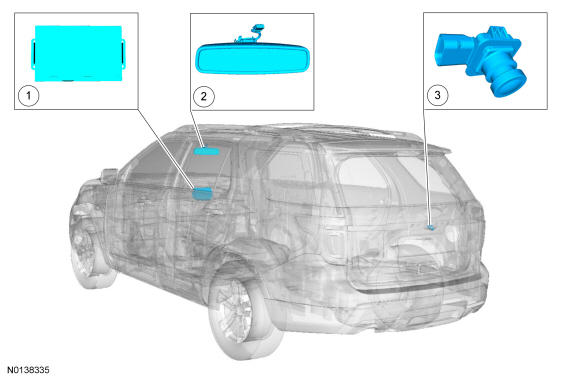
Component Location
| Item | Description | Comments |
|---|---|---|
| 1 | FDIM | - |
| 2 | Auto-dimming interior mirror | police package |
| 3 | Video camera | - |
Overview
The video camera system visually aids the driver while reversing or reverse parking the vehicle. For police package vehicles, the image of the area behind the vehicle is displayed in the LH side of the auto-dimming interior mirror assembly. For all other vehicles, the image of the area behind the vehicle is displayed in the FDIM. The video camera system is controlled though the FDIM. There are no camera controls on police package vehicles. Refer to the Owner's Literature for operating the video camera system features.
System Operation
System Diagram
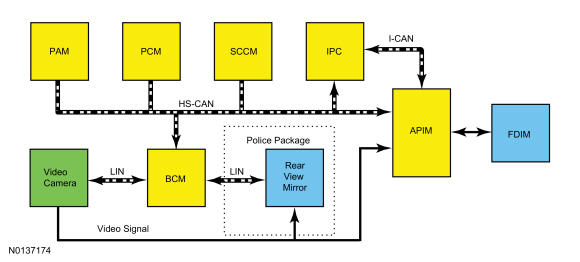
Network Message Chart
BCM Network Input Messages
| Broadcast Message | Originating Module | Message Purpose |
|---|---|---|
| Steering angle count | SCCM | Used to create the vehicle intended path on video display. Sent to the video camera via the LIN circuit. |
| Transmission in reverse | PCM TCM | Used to enable the video display. Sent to the video camera via the LIN circuit. |
| Parking aid range to object | PAM | Used to highlight the zone where an object is detected. Sent to the video camera via the LIN circuit. |
| Backup camera commands | APIM | Used to command the static and active guidelines status, zoom level and object distance Sent to the video camera via the LIN circuit. |
APIM Network Input Messages
| Broadcast Message | Originating Module | Message Purpose |
|---|---|---|
| Backup camera status | BCM | Used to display the video status for static and active guidelines, zoom level and object distance. |
Image Display
The liftgate must remain closed for correct operation of the video camera system.
The video camera system has 5 video features that are controlled in the FDIM :
- Fixed guidelines - this feature assists the driver with backing into a parking space or aligning the vehicle with an object.
- Active guidelines - this feature projects the intended path of the vehicle based upon steering wheel input.
- Visual park aid alert - this feature assists the driver to visually see the object causing the parking aid system to sound.
- Manual zoom - this feature assists the driver with connecting or towing a trailer allowing the driver to manually zoom closer to an object behind the vehicle.
- Video camera delay - this feature allows the driver to see the image behind the vehicle after the vehicle is shifted out of REVERSE and the vehicle speed has not exceeded 8 kmh (5 mph). The image will not be displayed if the vehicle is shifted into PARK.
For each one of these system features except the camera delay feature, the APIM sends requests to the BCM. The BCM sends the commands to the video camera over a dedicated LIN. The video camera delay feature is controlled with in the APIM.
All of the video camera features are enabled and disabled within the FDIM menu screen. The video camera delay feature keeps the image displayed on the FDIM until the vehicle reaches 8 kmh (5 mph) when the vehicle is shifted out of REVERSE or if any button on the FDIM is pressed. The video camera fixed guidelines feature displays guidelines on top of the video image to assist the driver with alignment of the vehicle. A dashed line on the displayed image represents the center of the vehicle and 3 color-coded lines (red, yellow, green) identify different zones between the rear of the vehicle and objects.
The color-coded lines cannot indicate accurate or consistent distances between objects located behind the vehicle and at the rear of the vehicle. This normal condition is due to variances in vehicle ride height, including, but not limited to, vehicle loading.
The manual zoom feature is controlled by the video camera. The manual zoom feature has 3 zoom levels that are only active when the vehicle is in REVERSE. If the manual zoom feature is enabled and the vehicle is shifted out of REVERSE the manual zoom feature is disabled. The manual zoom feature must be re-enabled the next time the vehicle is shifted into REVERSE.
The BCM and the video camera communicate on a LIN which is a dedicated single wire communication network.
The messages sent from the BCM to the video camera are:
- transmission selector (PRNDL) status (REVERSE/not REVERSE only)
- liftgate ajar status
- camera configuration data
- display manual zoom request
- parking aid audible warning status
- parking aid sensor distance to object data
The messages sent from the video camera to the BCM are:
- camera status
- display zoom status
- camera part number data
- visual park aid alert status
- fixed guideline status
Image Display - Police Package
The liftgate must remain closed for correct operation of the video camera system.
The video camera system has 2 video features:
- Fixed guidelines - assists the driver with backing into a parking space or aligning the vehicle with an object.
- Video camera delay - allows the driver to see the image behind the vehicle after the vehicle is shifted out of REVERSE. The image will not be displayed if the vehicle is shifted into PARK.
The video camera delay feature is controlled within the rear view mirror. The video camera delay feature keeps the image displayed on the rear view mirror until the vehicle reaches 8 kmh (5 mph), when the vehicle is shifted out of REVERSE. The video camera fixed guidelines feature displays guidelines on top of the video image to assist the driver with alignment of the vehicle. The guidelines are only available when the transmission is in REVERSE. Three color-coded lines (red, yellow, green) identify different zones between the rear of the vehicle and objects.
The color-coded lines cannot indicate accurate or consistent distances between objects located behind the vehicle and at the rear of the vehicle. This normal condition is due to variances in vehicle ride height, including, but not limited to, vehicle loading.
The BCM and the video camera communicate on a LIN, which is a dedicated single wire communication network.
The messages sent from the BCM to the video camera are:
- Transmission selector (PRNDL) status
- Liftgate ajar status
- Camera configuration data
The messages sent from the video camera to the BCM are:
- Camera status
- Camera part number data
- Fixed guideline status
Visual Park Aid
The visual park aid alert feature utilizes the 4 parking aid sensor inputs from the PAM and the video camera image. When the transaxle selector is in REVERSE and an object is detected in the path of the parking aid sensor, parking aid range to object data is sent from the PAM through the BCM to the video camera.
The visual alerts are red, yellow or green and appear as highlights on top of the displayed image to indicate in which zone the object is detected. The highlighted visual alerts are still operational if the parking aid system is disabled within the IPC and the visual alert feature is enabled.
Active guidelines display the intended vehicle path based upon the steering wheel angle.