Sync 3 Intermittent Blank/Black Screen Diagnostics (19-7007)
Reference number: 19-7007
SYNC 3 INTERMITTENT BLANK/BLACK SCREEN DIAGNOSTICS
TECHNICAL SERVICE BULLETIN
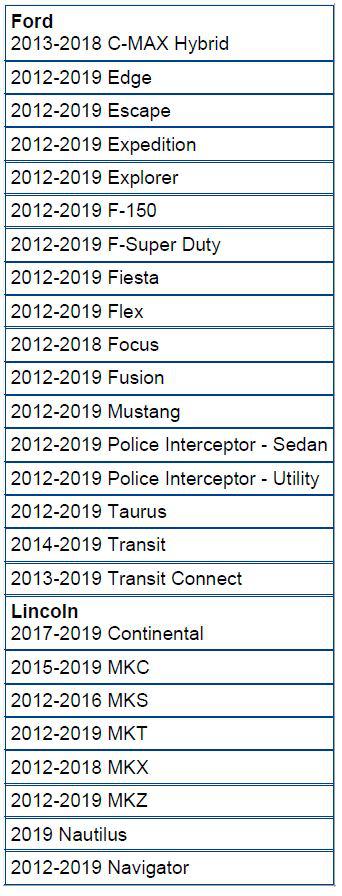
| FORD: | See list below |
| LINCOLN: | See list below |
MODEL
SUMMARY
SYNC 3 Intermittent Blank/Black Screen Diagnostics
This article supersedes G0000097 to update the vehicle model years affected.
This bulletin describes the definitions, possible causes and related diagnostics for blank/black screens on SYNC 3 infotainment systems.
What Is Considered A Blank/Black Screen?
A blank/black screen on a SYNC 3 equipped vehicle is defined as the front display interface module (FDIM) having no image while the ignition is on. This may be an event that takes place for as little as a fraction of a second, or may persist as a hard fault.
The term Blank/Black Screen does not cover a condition where the FDIM is unresponsive to touch inputs, frozen, or where the FDIM remains one color (such as blue). These concerns will be most accurately diagnosed by following the Symptom Chart entry for The FDIM Is Inoperative Or Does Not Operate Correctly in the appropriate subsection of Workshop Manual (WSM), Section 415-00. However, if the concern is intermittent, the Tips section of this document may be helpful for duplication of the concern.
POSSIBLE CAUSES FOR A BLANK/BLACK SCREEN
- Power, ground, communication circuits to the APIM, APIM connector, or other modules on the network
- Damaged LVDS cable or bad connections
- Software
- Damaged APIM
- Damaged FDIM
DEFINITIONS
APIM - accessory protocol interface module
This module controls SYNC functions and processing. The APIM communicates on multiple CAN networks, but will communicate with the Ford diagnostic scan tool on the highest-priority network (HS1-CAN or HS-CAN).
FDIM - front display interface module
On a SYNC 3 system, this is the touchscreen display. This display receives power and ground and transfers signals over the LVDS cable (defined below). It is important to note that a SYNC 3 FDIM is not connected to a CAN network. On some vehicles, FDIM may be listed during a Network Test. The FDIM will read FAIL; however, this does not indicate that the SYNC 3 FDIM has failed. Vehicles with First Generation SYNC may have an FDIM that is connected to a CAN network - this system is not within the scope of this document.
LVDS Cable - low voltage differential signaling cable
This cable contains 4 conductors and is the only connection between the APIM and the FDIM, providing power, ground, and data transfer to and from the FDIM. This cable is replaced separately from the APIM or FDIM, and can be tested for resistance and pin fit.
For more information on these or other components of the SYNC 3 System, please refer to the appropriate sub-section of WSM section 415-00 > Description and Operation.
DIAGNOSTIC FLOWCHART
- Can the customer concern be duplicated through the normal repair process?
- Yes - proceed to Step 3.
- No - refer to Tips For Duplicating An Intermittent Blank/Black Screen in this article. Proceed to Step 2
- Can the concern be duplicated?
- Yes - proceed to Step 3.
- No - refer to the dealership No Problem Found process. End of flowchart.
- Does the FDIM remain blank/black at startup?
- Yes - Refer to Network Wake-up Diagnosis later in this article. End of flowchart.
- No - proceed to Step 4.
- Does the FDIM go blank/black when the vehicle is shifted into REVERSE?
- Yes - refer to Reverse Gear Diagnosis later in this article. End of flowchart.
- No - proceed to Step 5.
- When the fault occurs, does the FDIM display the (Ford/Lincoln/etc.) Splash Screen, then return to the Home Screen?
- Yes - refer to Power/Ground/APIM Diagnosis later in this article.
- No - refer to LVDS/FDIM Diagnosis later in this article.
TIPS FOR DUPLICATING AN INTERMITTENT BLANK/BLACK SCREEN
Duplicating a blank/black screen:
- Refer to WSM Section 100-00 > General Information > Description and Operation > Diagnostic Methods.
- Utilize multiple SYNC features at the same time.
- Turn on high-current vehicle loads, such as rear defrost, HVAC blower, heated/cooled seats, windshield wipers, headlights, fog lights, etc.
- Attempt to duplicate the concern with the key on, engine off (KOEO).
- Check harnesses and connectors such as the LVDS cable and the APIM harness and connector per WSM section 415-00.
- Check for TSBs/SSMs that relate to a specific symptom or DTC.
If the concern cannot be verified through normal diagnostic processes:
- Consult with the customer to determine the following:
- Amount of time before the fault occurs, temperature, road conditions (bumps, turns, etc.), operating conditions, and SYNC features being used at the time of the fault.
- Replicate the conditions that the customer described in order to duplicate the fault.
- If possible, request the customer to duplicate the concern with dealership personnel. Note the steps/conditions to reproduce the fault.
- Did the customer note if the SYNC VOICE button on the steering wheel is operational when the screen is blank/black?
- If so, this indicates that the APIM is able to hear and process voice commands, and is most likely functional. Refer to LVDS/FDIM Service Tips later in this article.
- If not, this indicates that the APIM is not functional at the time of the blank/black screen.
Refer to Power/Ground/APIM Diagnosis later in this article.
TESTING ROUTINES
Network Wake-up Diagnostics
Symptom Description
If the FDIM remains blank/black after the vehicle ignition is turned on, the most likely cause is that the APIM did not receive an ignition status (wake-up) message. The APIM receives battery power at all times, and receives an ignition status message over the CAN network. This message may be transmitted over different networks depending on the vehicle - typically, the message will be relayed from the body control module (BCM) to the gateway module (GWM) or instrument cluster (IPC), then from the GWM or IPC to the APIM over the highest-priority network that is connected to the APIM.
The path of the wake-up message can be determined from the CAN Multiplex Messages chart in WSM, Section 418-00 > Description and Operation> Communications Network - System Operation and Component Description. The message is listed as Ignition Status, and as described, it may be sent from the BCM to a gateway module, and then to the APIM.
Service Tips
To determine whether the APIM is receiving the correct ignition status, reference WSM section 415-00 > Diagnosis and Testing> Information and Entertainment System, and navigate to the pinpoint test for the symptom The FDIM Is Inoperative Or Does Not Operate Correctly. Reference Network Test to determine if a different module or network is causing this concern. Please note that HS1 is utilized by the Ford diagnostic scan tool to communicate to the APIM; however, Ignition Status is communicated to the APIM across I-CAN or HS3-CAN depending on vehicle type. If the gateway module for the vehicle (GWM or IPC) is not relaying the message between the different networks, then it is suspect.
Refer to WSM section 418-00 > Diagnosis and Testing to further diagnose a network communication fault. If only the APIM is losing communication when the blank/black screen fault is present, refer to the symptom chart entry for The APIM Does Not Communicate With The Scan Tool. If an entire network is found to be offline, refer to the symptom chart entry for No [affected network] Communication, All Modules Are Not Responding. For a network-wide fault, it may also be useful to refer to the No Network Communication GSB available on OASIS.
Reverse Gear Diagnosis
Symptom Description
If the FDIM only becomes blank/black when the vehicle is shifted into reverse gear, this may indicate that a fault is present with the rear view camera (RVC) system. Note if the RVC camera guidelines are present when this occurs.
Service Tips
Diagnose RVC faults using the appropriate sub-section of WSM Section 413-13 > Diagnosis and Testing. Follow the symptom chart entry for The Rear Video Camera System Is Inoperative Or Does Not Operate Correctly while the fault is present. The RVC camera guidelines shown on the touchscreen are created by the APIM itself. If no camera image is present, but the guidelines are present, this indicates that the APIM and FDIM are functioning properly, but the camera image is missing. If no camera image or guidelines are present in Reverse, but all other SYNC functions are operating correctly in other gear ranges, the APIM is suspect. Refer to the Power/Ground/APIM Diagnosis section of this document.
Power/Ground/APIM Diagnosis
Symptom Description
When the FDIM displays the Ford/Lincoln/Mustang/Raptor/Black Label splash screen, this indicates that the APIM is powering up or rebooting. Possible causes for this behavior are a loss of sufficient power or ground, a loss of ignition status, or an internal APIM fault.
Note that SYNC 3 resets itself every ignition cycle, unlike previous versions of SYNC. In most cases, performing a reset at the dealer may temporarily resolve a customer symptom, but a systemic concern may return after some time. A two-button reset (holding the SEEK UP and audio Power buttons on the FCIM for approximately 5 seconds), as referenced in the Owner's Manual and WSM, will also have the signature of a blank/black screen followed by the splash screen like an ignition cycle.
The APIM in SYNC 3 vehicles may perform an action referred to as software Self-Healing. In some cases, if the APIM becomes unresponsive, it will recognize that it has entered a faulted state and reboot, which will also display the splash screen. This self-healing feature is designed to quickly restore the SYNC system if a fault occurs occasionally; however, if the APIM enters self-healing events continuously, this could indicate a software or hardware fault. In order to determine if the APIM is self-healing excessively as the customer's concern, power or ground faults should be ruled out.
Service Tips
Reference APIM connector in the Wiring Diagrams tab of PTS for pinout and location information.
If the blank/black screen can be duplicated by wiggle testing, a circuit or connector pin fit concern is likely.
Follow the procedure in WSM section 100-00 > Description and Operation > Diagnostic Methods > Wiring Pin (Terminal) Fit. If the blank/black screen is not affected by wiggle testing, follow the steps that were determined to cause the blank/black screen to occur in the Tips For Duplicating An Intermittent Blank/Black Screen section in this article. With the blank/black screen present, follow the Checking Power-Providing Circuits and Checking Ground-Providing Circuits procedures in the same page of WSM Section 100-00 to determine if a power or ground fault is present.
If the testing above does not reveal a fault, a fault internal to the APIM is likely.
LVDS/FDIM Service Tips
Symptom Description
If the FDIM becomes blank/black, this may not necessarily mean that the APIM has rebooted. If the FDIM returns to the same screen that was previously displayed and does not display the Ford/Lincoln splash screen, this also indicates that the APIM did not reboot or lose power. Likely causes of a concern that matches this description are a faulty LVDS cable, poor LVDS cable connections, low battery/charging voltage, or a faulty FDIM.
Service Tips
Reference LVDS Connectors in the Wiring Diagrams tab of PTS for pinout and location information for the LVDS cable.
To test the LVDS cable, reference LVDS connectors in the Wiring Diagram and the LVDS test in WSM section 415-00 > Diagnosis and Testing> Information and Entertainment System, and navigate to the Pinpoint Test for the symptom The FDIM Is Inoperative Or Does Not Operate Correctly. Attempt to wiggle LVDS cable during the continuity test.
If the LVDS cable is proven out through testing and an intermittent blank/black screen concern is still present with no splash screen (the APIM is not rebooting), the most likely cause is a faulty FDIM.
If the blank/black screen symptom occurs with high amperage draw from accessories, during KOEO or an engine auto start/stop event, verify the power and ground circuits to the APIM connector by following WSM Section 100-00 > Description and Operation > Diagnostic Methods.