Information and Entertainment System Premium Plus: Notes
Component Location
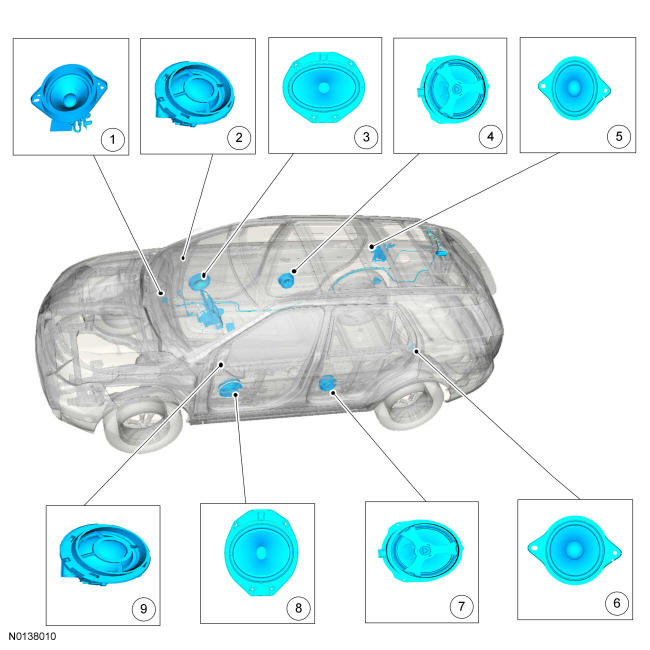
Component Location
| Item | Description | Comments |
|---|---|---|
| 1 | Instrument panel speaker | - |
| 2 | RH tweeter speaker | - |
| 3 | RF door speaker | - |
| 4 | RH rear door speaker | - |
| 5 | RH quarter trim panel speaker | - |
| 6 | LH quarter trim panel speaker | - |
| 7 | LH rear door speaker | - |
| 8 | LF door speaker | - |
| 9 | LH tweeter speaker | - |
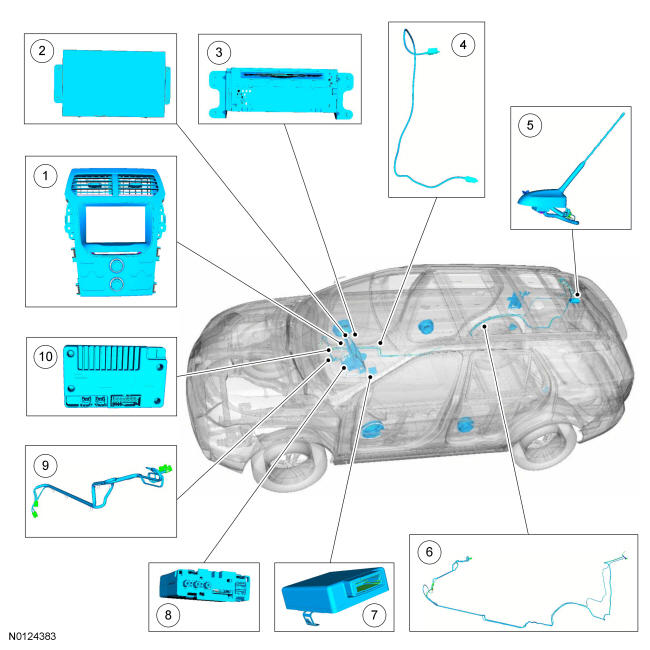
Component Location
| Item | Description | Comments |
|---|---|---|
| 1 | FCIM | - |
| 2 | FDIM | - |
| 3 | ACM | - |
| 4 | USB cable | - |
| 5 | Antenna | - |
| 6 | Antenna cable | - |
| 7 | GPSM | - |
| 8 | Media hub | - |
| 9 | Antenna cable | - |
| 10 | APIM | - |
Overview
The audio system consists of an 9-speaker system with an AM/FM single CD ACM, 8-inch (203 mm) touchscreen FDIM, redundant steering wheel switches, SYNC ® with media hub, optional navigation and optional satellite radio.
The SYNC ® system is a hands-free communication and entertainment system that provides the ability to:
- Send and receive phone calls via a Bluetooth-enabled phone
- Send and receive text messages via a Bluetooth-enabled phone
- Connect media devices (such as an iPod or USB device) in order to play audio files
- Play media files via a Bluetooth-enabled audio device
- Access a WiFi signal receiver for in-car internet access (requires customer-supplied USB modem)
- Produce vehicle health reports
- Initiate an emergency call (eCall) when the air bags deploy
In addition to entertainment system control, the operator can also control the climate control system, the ambient lighting system (if equipped), and several other vehicle systems using either the touchscreen or voice controls.
While SYNC ® supports many features, not all features are available with every phone. For example, text messaging is supported by SYNC ® ®, but not available with most phones.
System Operation
System Diagram
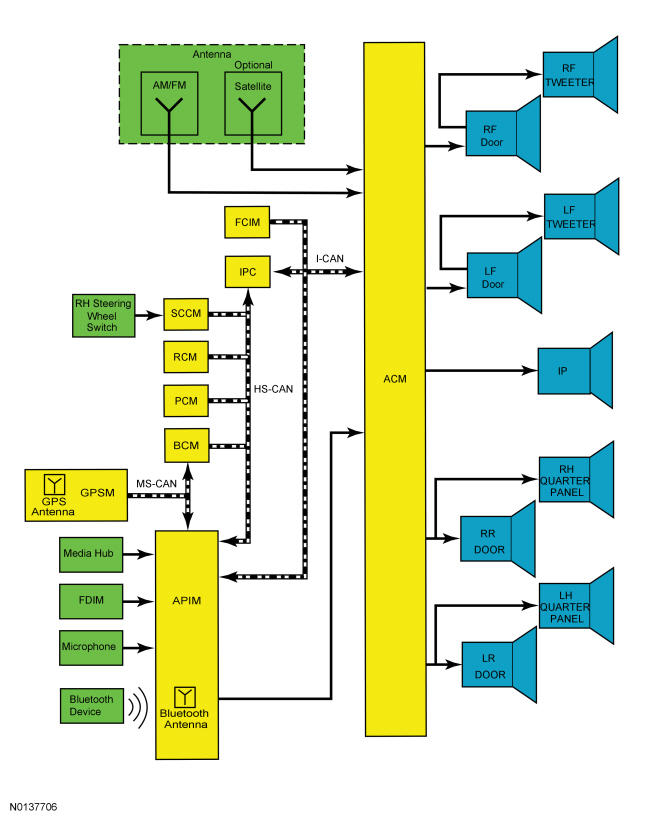
Network Message Chart
It is very important to understand the following:
- Where the input originates
- All of the information necessary for a feature to operate
- Which module(s) receive(s) the input or command message
- Which module controls the output of the feature
- If the module that receives the input controls the output of the feature, or whether it outputs a message over the CAN to another module.
Module Network Input Messages - ACM
| Broadcast Message | Originating Module | Message Purpose |
|---|---|---|
| Belt-Minder ® Status | IPC | When this signal is active, the speaker output is muted to allow the Belt-Minder ® tone to be more easily heard. This message only applies to vehicles with MyKey ® enabled. |
| Chime request | IPC | Used to mute the audio system so a chime from the IPC can be heard. |
| Day/night status | BCM | Used for day/night illumination status for the audio system. |
| FCIM button state | FCIM | Indicates when a button is pressed on the FCIM so the audio system can make the desired setting change. |
| Ignition status | BCM | Ignition RUN, START and ACCESSORY states required for the ACM operating modes and fault reporting. |
| Illumination dimming level | BCM | Controls the backlight intensity, based on the input from the dimmer switch. |
| MyKey ® volume limit status | IPC | Used by the ACM to limit the audio system volume when a MyKey ® restricted key is in use. |
| Set point volume | FCIM | Used for volume adjustment set point from the FCIM to the ACM. |
| Set volume | FCIM | Used for set volume from the FCIM to the ACM. |
| Steering wheel switch data | SCCM | Used for the 3 RH 2-way steering wheel switch input signals to control the redundant audio system functions. |
| Vehicle speed | PCM | Vehicle speed data used for speed compensated volume function. |
| Volume cutback | IPC | Used to mute the audio system so a parking aid speaker chime or warning notification from the IPC can be heard. |
Module Network Input Messages - APIM
| Broadcast Message | Originating Module | Message Purpose |
|---|---|---|
| Airbag deployment eCall notification | RCM | This message indicates air bag deployment has occurred. |
| Airbag deployment status | RCM | This message is for monitoring air bag deployment status for confirmation of eCall notification. |
| Ambient light color and intensity actual | HVAC module | This message is for selection of ambient light color and intensity through the FDIM. |
| ACM CD information | ACM | ACM sends CD information to be displayed on the FDIM. |
| ACM configuration | ACM | Used to verify the correct configuration and modules are installed. |
| ACM radio functions | ACM | Used to display the ACM radio functions such as seek, tune and AM/FM stations on the FDIM. |
| ACM sound options | ACM | Used to display the ACM radio sound functions such as treble, bass, navigation command volume and phone volume on the FDIM. |
| Day/night status | BCM | Used for day/night illumination status for the FDIM. |
| eCall notification | RCM | This message indicates eCall notification is being initiated and due to air bag deployment. |
| FCIM button state | FCIM | Indicates when a button is pressed on the FCIM so the audio system can make the desired setting change. |
| GPS Data | GPSM | Used for vehicle positioning, heading and direction to the APIM for navigation. |
| Ignition status | BCM | Ignition RUN, START and ACCESSORY states required for the APIM operating modes and fault reporting. |
| Illumination dimming level | BCM | Controls the backlight intensity, based on the input from the dimmer switch. |
| Navigation rolling wheel count and direction | ABS module | This message provides for more accurate tracking of the vehicle position when the GPS signal is temporarily unavailable for gear lever position for vehicle direction data for navigation. |
| Satellite radio mode | ACM | Used to display the satellite radio modes and functions. |
| Satellite radio status | ACM | Used to display the satellite radio modes and functions. |
| Selector lever (PRNDL) status | BCM | Used to verify the gear lever position for vehicle direction data for navigation. |
| Set point volume | FCIM | Used for volume adjustment set point from the FCIM to the APIM. |
| Steering wheel switch data | SCCM | Used for the RH steering wheel switch input signals to operate the IPC infotainment display and SYNC ® functionality. |
| Vehicle configuration data | BCM | Used to verify vehicle configuration data such as VIN and system module configuration. |
| Set volume | FCIM | Used for set volume from the FCIM to the APIM to be displayed on the FDIM. |
| Vehicle speed | PCM | Vehicle speed data used for navigation functionality. |
Module Network Input Messages - FCIM
| Broadcast Message | Originating Module | Message Purpose |
|---|---|---|
| Day/night status | BCM | Used for day/night illumination status for the FCIM. |
| Ignition status | BCM | Ignition RUN, START and ACCESSORY states required for the FCIM operating modes and fault reporting. |
| Illumination dimming level | BCM | Controls the backlight intensity, based on the input from the dimmer switch. |
Module Network Input Messages - GPSM
| Broadcast Message | Originating Module | Message Purpose |
|---|---|---|
| Ignition status | BCM | Ignition RUN, START and ACCESSORY states required for the GPSM operating modes and fault reporting. |
| Navigation rolling wheel count and direction | BCM | Used to verify the gear lever position for vehicle direction data for navigation. |
| Selector lever (PRNDL) status | BCM | Used to verify the selector lever status for navigation. |
| Vehicle yaw rate | RCM | Used to verify the vehicle acceleration data for navigation. |
Module Network Input Messages - IPC
| Broadcast Message | Originating Module | Message Purpose |
|---|---|---|
| APIM Bluetooth status | APIM | Used for Bluetooth phone status and data for microphone mute and signal strength. |
| ACM configuration | ACM | Used to verify the correct configuration and modules are installed. |
| Display language request | APIM | Indicates language selection. |
AM/FM Radio
The roof-mounted antenna receives AM/FM radio waves. The audio signals are sent from the roof-mounted antenna, via the AM/FM antenna cable to the ACM. The ACM converts the radio waves to a fluctuating AC output voltage to the system speakers.
APIM Programming
The APIM for this vehicle requires specific programming procedures for correct operation. APIM programming is required when:
- APIM is replaced
- Programming is required when the APIM is replaced.
- Directed by a TSB
- Updates to resolve SYNC ® performance concerns can only be performed when directed by a TSB.
- Upgrades are requested
- Occasional upgrades and/or new applications can be programmed when they become available. This type of programming is available upon customer request and expense.
Types of Programming
There are 3 types of APIM programming available:
- Module Replacement - used when the APIM has been replaced. This type of programming performs the required provisioning.
- Standard - used to update the APIM and any currently installed Applications to the latest software level.
- Custom - shows all available software options (including Applications that may not have been previously installed) that can be programmed into the APIM. Use this selection when upgrades become available or as directed by a TSB.
Software Installation Methods
There are 3 types of software installation methods:
- Full Flash (Force CIP) - a CIP program is the entire software package for the APIM. Performing a Full Flash erases the existing APIM software and installs the complete program. A Full Flash should only be performed if a Service Pack is not available. If a Full Flash is performed, all Applications must be re-installed. Performing a Full Flash by selecting Force CIP requires additional programming time and is not necessary unless directed by a TSB.
- Service Pack - a Service Pack update only provides the necessary software to update the existing APIM program to a new level. For example, a Service Pack would change the software program from and 'AA' to an 'AB' version level. It does not delete or overwrite the existing APIM software. A Service Pack is a much smaller program than a Full Flash and requires less downloading and programming time. A Service Pack software installation should always be performed instead of a Full Flash, if possible.
- Applications - Applications are special software programs that may be installed on the APIM. Applications necessary for each vehicle are determined by the vehicle build information stored in the Ford online database. Selecting individual Applications for installation may not be necessary every time the APIM is programmed.
General Programming Instructions
There are some general programming guidelines that are applicable to multiple types of programming:
- Service Pack and Applications
- A USB flash drive with a minimum 1 gigabyte (GB) storage capacity is required.
- The file is downloaded from the Ford online database onto the flash drive. The files are then transferred via the flash drive to the APIM through the vehicle USB port.
- Full Flash/Force CIP
- The scan tool, along with the SYNC ® Re-Flash Kit (or equivalent) are required to complete the flash procedure.
- All previously paired phones are deleted from the SYNC ® system.
- The file needs to be downloaded from the Ford online database. Allow for extra time in order to complete the download. The compressed files are between 200 and 400 megabytes (MB), and once downloaded will be extracted to the full size of approximately 2 GB.
- Once scan tool programming is complete, applications need to be installed with the USB flash drive. This should be accomplished by connecting the USB flash drive to the media hub.
To perform module replacement programming, Refer to Accessory Protocol Interface Module (APIM) Module Replacement Programming .
To perform standard programming, refer to Accessory Protocol Interface Module (APIM) Standard Programming .
To perform custom programming, refer to Accessory Protocol Interface Module (APIM) Custom Programming .
Audible Prompts
The APIM receives both stereo and mono sound inputs, and can also transmit both stereo and mono sound. The mono function is used to receive the microphone input. It is also used to send sound to the ACM for voice prompts, the TTS feature, ringtones, and any audio received through a connected mobile phone. The TTS feature speaks information so that it does not have to be read from the display.
Audio Extended Play
The audio extended play is a feature that enables the audio system after the ignition is off and any door has been opened. When the power button on the FCIM is pressed, the audio system functionality is restored and remains active for a period of 20-60 minutes, depending on configuation settings. To turn the audio system off, the power button on the FCIM is pressed. The audio extended play is disabled if the battery saver function is enabled.
Battery Load Shed
The BCM uses the battery current sensor to keep track of the battery state of charge. The battery current sensor is a hall-effect sensor attached to the battery ground cable. When the engine is off, and the BCM determines the battery state of charge is below 40% or 10% of the charge has been drained or 45 minutes have elapsed, a load shed message is sent over the CAN. This message turns off the audio/navigation system to save the remaining battery charge. Under this condition, SYS OFF TO SAVE BATT is displayed on the centerstack infotainment display to notify the driver that battery protection actions are active.
Engine off load shed occurs when the engine is not running, and the ignition is in the ACC or RUN position. To clear the load shed state, restart the engine.
Bluetooth Mode
Bluetooth is a secure, short-range radio frequency that allows devices to communicate wirelessly through radio waves. The operating range of a Bluetooth signal is a maximum of 9.75 m (32 ft).
The Bluetooth interface can accommodate both Bluetooth-enabled mobile phones and Bluetooth-enabled media devices. The SYNC ® system allows interaction with several types of customer Bluetooth devices, including mobile phones and media devices. The APIM contains an on-board Bluetooth chipset, which enables certain wireless devices to interact with the system. Any Bluetooth device used with the SYNC ® system must first be paired with the system before it is operational.
Only one Bluetooth phone and one Bluetooth media device can be connected to the system at any one time. If an additional device of either type is paired with the system and made active, the APIM disconnects any active connection and establishes a connection with the new device.
When a new Bluetooth device is added, the APIM and the Bluetooth device must be paired together. Most Bluetooth devices can pair with the SYNC ® system, although functionality may vary. To determine if a Bluetooth device is supported, verify the customer device is on the compatibility list for the current APIM software level.
Pairing a Bluetooth device is accomplished through the "Add Device" selection of the phone menu. When pairing a device, the SYNC ® system generates a unique PIN that must be entered on the Bluetooth device in order for the pairing process to be successful. There are also some device-specific actions that must take place. For additional information on the pairing process, refer to the Owner's Literature.
It is important to understand that not all mobile phones have the same level of features when interacting with the SYNC ® system. For a list of compatible phones, refer to www.syncmyride.com.
Composite Audio-Video Input Mode
The composite audio and video inputs consist of the RCA jack connections that are used for playing video or audio content from an external device (such as a gaming system). The media hub contains an internal composite audio/video translator connected to the external RCA jacks, which output video and audio signals to the APIM via a shielded audio and video harness.
IPC Infotainment Display
The RH side of the IPC contains an infotainment display. This screen displays a subset of infotainment information, and it is controlled by the 5-way RH steering wheel switch.
MyKey ® Audio Operation
When a MyKey ® is in use:
- the audio system is muted whenever the Belt-Minder ® is activated until the safety belts are buckled.
- the satellite radio adult content stations are restricted.
- if always on is selected in the MyKey ® menu then 911 assist and do not disturb feature are enabled and cannot be disabled.
The MyKey ® also has an optional setting that limits the audio system volume. The maximum volume of the audio system is limited to 45%. In an attempt to exceed the limited volume, the MyKey ® VOLUME LIMITED message is displayed in the centerstack infotainment display. The speed compensated volume feature will be disabled.
Navigation
The navigation system guides the user to a pre-entered destination. Map data is read from the map data Secure Digital (SD) card plugged into the media hub. The APIM calculates route information based on GPS data received by the GPSM. The APIM also uses vehicle speed and transmission gear selected signals received through the network to detect vehicle speed and direction, resulting in more accurate navigation tracking. The navigation display is shown on the FDIM.
The compass heading is derived from the GPS antenna signal. There are no serviceable parts for the compass.
The voice recognition system allows the user to interface with the system without using the touchscreen. A microphone, located in the headliner, provides a direct input to the APIM.
Satellite Radio
The AM/FM satellite antenna receives digital signals and sends them to the ACM through the satellite radio antenna cable. The satellite radio receiver is built-in to the ACM.
SD Card Audio Mode
The Secure Digital (SD) card slot can be used for playing audio content that is stored on the Secure Digital (SD) card.
SD Card Video Mode
The Secure Digital (SD) card slot has the capability to view photos stored on memory Secure Digital (SD) cards and display them on the FDIM.
SIRIUS ® Data Services
The satellite radio system has SIRIUS ® data services that are separate subscription services received through the satellite receiver. In navigation mode, the traffic/weather is displayed and is used to anticipate traffic delays and find alternate routes to the destination. The data services include periodic updates for:
- Traffic
- Movies
- Weather
- Gas prices
- Sports score tracking
Some services may be available separately while others are only available as packages.
Speed Compensated Volume
The ACM adjusts the audio system volume based on the VSS signal to compensate for speed and wind noise.
When a MyKey ® is in use and the MyKey ® radio volume limiter is enabled, the speed compensated volume is disabled.
Steering Wheel Switch Function
The RH steering wheel switches consist of an integrated 5-way upper switch and three 2-way toggle lower switches. The 5-way steering wheel switch operates the IPC infotainment display. The three 2-way toggle steering wheel switches operate the audio system functions including SYNC ® ®.
SYNC ® Traffic, Directions and Information
The SYNC ® traffic, directions and information service is a subscription-based service that includes precise turn-by-turn directions, personalized real-time traffic updates with text alerts, business search, entertainment, news, sports, stocks, travel and weather. The customers mobile phone is used to access and download the SYNC ® services. The GPS antenna that is integral to the GPSM is used to detect the location and direction of the vehicle. For additional information on the traffic, direction and information services subscription, refer to www.syncmyride.com.
USB Audio Mode
The USB port can be used for connecting a media device (such as an iPod) with the device's available cable, or for directly plugging in a portable mass storage device (such as a "thumb drive"). When playing media files stored on a mass storage device, the SYNC ® system only plays files that do not have DRM protection. The USB port can also be used for uploading vehicle application upgrades. The USB port is powered by the APIM, so no external power source is needed to power a device plugged into the USB port if the device supports this feature.
In addition to audio information, metadata (information as artist, album title, song title, and genre) may also be sent to the APIM from a device plugged into the USB port. The APIM uses the metadata to create indexes that can be used to sort for particular music, based on customer preference. Not all USB devices can send metadata to the APIM. When a new media device is connected to the SYNC ® system, the APIM automatically indexes the information. This may take several minutes (depending on the amount of data on the device), and is considered normal operation. When a device that was previously connected to the SYNC ® system is reconnected, the APIM updates the index (rather than creating a new one), which reduces the amount of time needed to index the device.
USB Video Mode
The USB port has the capability to view photos stored on memory devices and display them on the FDIM.
Voice Recognition
Voice recognition is used for many vehicle functions, including audio system and climate controls. The microphone relays the microphone input to the APIM through dedicated wiring. The TTS and voice prompt features speak certain text information and interaction requests to minimize driver distraction by having to look at the audio system display while driving. The ringtone alerts the driver to an incoming call. The microphone is also used to detect outgoing audio during a phone call.
Audible prompts can range from a simple tone to more elaborate spoken text, based on the customer setting. When interaction mode is set to standard, detailed guidance is provided. When interaction mode is set to advanced, most prompts are tones only and minimal audible guidance is provided. Refer to the Owner's Literature for further information on voice interaction.
The audio signals for the TTS and voice prompt features, the ringtones, and audio from the outside device during a phone call, are sent from the APIM to the ACM.