Removal And Installation: Installation
To avoid serious or fatal injury on vehicles equipped with airbags, disable the Supplemental Restraint System (SRS) before attempting any steering wheel, steering column, airbag, seat belt tensioner, impact sensor or instrument panel component diagnosis or service. Disconnect and isolate the battery negative (ground) cable, then wait two minutes for the system capacitor to discharge before performing further diagnosis or service. This is the only sure way to disable the SRS. Failure to take the proper precautions could result in accidental airbag deployment.
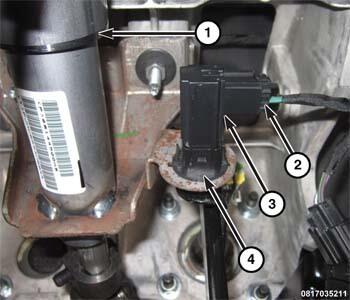
- Position the brake pedal position sensor (3) to the sensor bracket (4) on the brake pedal support bracket. The sensor needs to be indexed 1/4 turn clockwise.
- Release the brake pedal. Then pull the pedal lightly upward to be certain the pedal is in its normal at-rest position.NOTE:
Be certain the brake pedal position sensor is fully seated in the sensor bracket before completing the electrical connection.
- Connect the body wire harness connector (2) to the connector receptacle on the sensor (3).
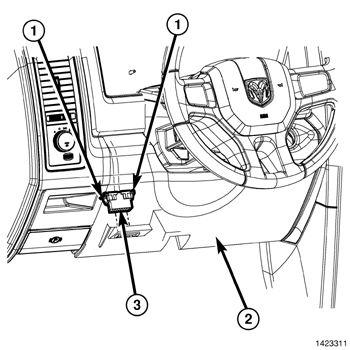
- Position the steering column opening cover (2) to the instrument panel and fully engage the retainer clips to the instrument panel.
- Install the two fasteners (2) that secure the steering column opening cover (1) to the instrument panel.
- Connect the negative battery cable. If equipped with an Intelligent Battery Sensor (IBS), connect the IBS connector.
- Perform the "Brake Pedal Calibration" and "Brake Pedal Learn" procedures as follows:
- Park the vehicle on level ground.NOTE:
When performing the Brake Pedal Calibration Learn routine, make sure the brake pedal is NOT pressed.
NOTE:Not all PCMs support the Brake Pedal Learn. If the PCM supports it the routine will be available.
- With the scan tool, under the ABS "Miscellaneous Functions" menu, select and run the "Brake Pedal Calibration" routine.
- With the scan tool, under the PCM "Miscellaneous Functions" menu, select and run the "Brake Pedal Learn" routine.NOTE:
This Brake Pedal Learn routine is available for 2018 model year or newer models. In the event that the vehicle is a 2017 model year or older, only the "Brake Pedal Calibration" routine will be available.
- Park the vehicle on level ground.