Engine NVH Testing With MOPAR Scope
The Set-up and testing of Engine NVH is the same as the procedure for Overall Vehicle NVH, but additional metrics can be added to the PicoDiagnostic Software to further isolate a vibration
- Using the prompts given by the "NVH" testing in the "PicoDiagnostics for Mopar Scope" software, set up the (special tool #2074503080, Module, Mopar Scope)
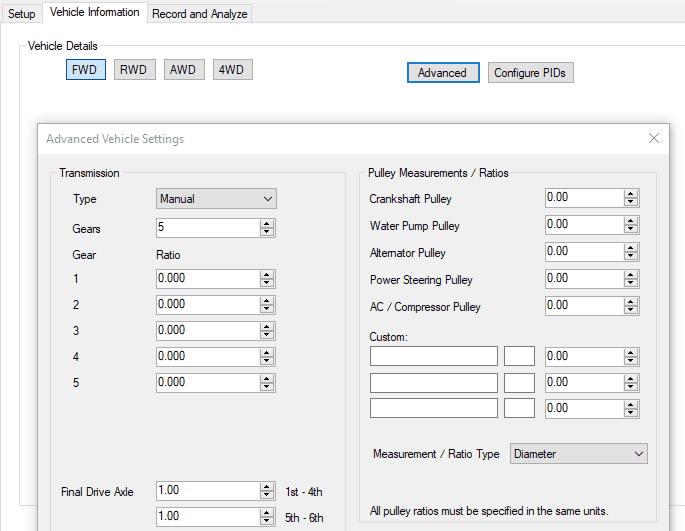
- Before recording and analyzing, utilize the "Advanced" button found under the "Vehicle Information" tab of the "PicoDiagnostics for Mopar Scope" software.
- At the "Advanced Vehicle Settings" screen, enter the Measurements/Ratios for each Pulley. Refer to the ENGINE PULLEY RATIO TABLE for available values.
The Software will accept any unit of measurement for the diameter of each Pulley as long as the measurements are the same unit. Example: inches can be used as long as all pulleys diameter measurements are in inches. Same applies to cm or mm .
- After entering and saving the pulley information, continue with the NVH testing as normal.
- Once the testing is complete, the data can be used to isolate what component may be at fault for the Noise, Vibration or Harshness condition.