EMEA Market
POWERING THE INSTRUMENTS
- GRX 3228 FCA: Connect the equipment to a socket (220 V AC power) and turn the ignition switch to ON.
- EXP 813 FCA: turns on automatically after the clips are connected correctly.
CONNECTING THE INSTRUMENTS
For all models in which the battery is easily accessible:
It is recommended to check the battery charge state by connecting the instrument directly to the battery terminals, leaving it connected to the car's electrical system.
Never connect the battery tester to the remote battery posts, unless otherwise directed. Connecting the battery tester to the remote battery posts will give a false test reading indicating that the battery is bad.
At the end of the check procedure, make sure that the clamps are tightened properly to the battery terminals.
For all models in which the battery is not easily accessible:
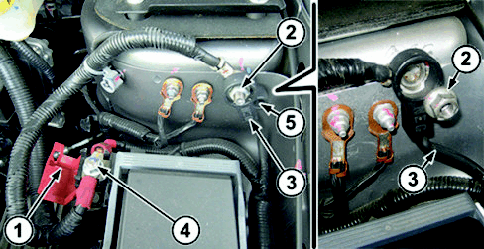
All battery charge and recharge state checks MUST be made with the battery earth lead (3 - Fig. 2) disconnected from the car's negative dummy pole, as follows:
- Remove the earth lead fixing nut (2).
- Disconnect the battery earth lead (3) from the negative dummy pole and reconnect it to the earth pin through the insulating hole (5) and lock it in position with the same nut (2).
- Open the cover (1) on the dummy positive pole (4).
Fig. 2 - Example picture of a Fiat Freemont
At the end of the check procedure:
- Close the cover (1) on the dummy positive pole (4);
- Remove the earth lead fixing nut (2);
- Pull the earth lead (3) out of the insulating hole (5), reconnect it to the negative dummy pole and lock it in position with the nut (2), tightening it to a torque of 2.8 daNm.
Use the leads in the kit to connect the instruments as follows:
- Red clip connected to the positive battery terminal (or to the positive dummy pole).
- Black clip connected to the negative battery terminal (or to the negative dummy pole).
The lead clips must be connected correctly; an incorrect connection could cause the following messages:
- On the EXP 813 FCA - CHECK CONNECTIONS
- On the GRX 3228 FCA - CHECK TERMINAL CONNECTIONS
If the leads are connected with the incorrect polarity, the tester will display the following message: TERMINALS REVERSED (the GRX 3228 FCA also emits an alarm signal).
CONFIGURING THE INSTRUMENTS FOR THE CHARGE STATE CHECK
In the main menu, use the LEFT and RIGHT arrows to select "BATTERY TEST" / "DIAGNOSIS" (battery icon on the display) and proceed as follows:
- Use the UP and DOWN arrows to select the TEST LOCATION:
- BATTERY TERMINAL (A)
- STARTER TERMINAL (B)
- Press the NEXT
button to continue.
- If BATTERY TERMINAL was selected, proceed as follows:
- Select the battery location:
- OUTSIDE THE VEHICLE
- IN THE VEHICLE
- Press the NEXT button to continue.
- Select the BATTERY TYPE:
- NORMAL - Flooded (Pb and Pb Heavy Duty)
- AGM - AGM with flat plates (Pb AGM)
- SPIRAL - AGM with spiral plates (Pb AGM Spiral)
- GEL - Pb with gel electrolyte (not normally used)
- Press the NEXT button to continue.
- Select the NOMINAL UNIT (TEST STANDARD) following the indications given on the battery's label, according to the following table:
Standard given on the battery Standard to select on the instrument IEC IEC EN EN (or EN1) EN2 EN2 EN2 - SAE (with the same current value) EN2 EN2 - IEC (with the same current value) EN2 - Press the NEXT button to continue.
- Select the POWER (current) relative to the selected standard as given on the battery's label.
- Press the NEXT
button to continue.
- If STARTER TERMINAL was selected, proceed as follows:
- Select the CAR BRAND
- CHRYSLER
- DODGE
- Press the NEXT button to continue.
- Select the CAR MODEL:
- One or more options are available, depending on the previously selected manufacturer.
- Press the NEXT button to continue.
- Select the BATTERY VALUE:
- It may not be required for some models, if they are equipped with a single type of battery.
- Press the NEXT button to continue.
The instruments must be configured correctly, setting the battery's rated values and test standards, as given on its label.
Depending on the instrument, proceed as follows:
Only on the Midtronics EXP 813 FCA
- Measure the TEMPERATURE by putting the sensor about 5 cm away from the battery. As soon as temperature reading stabilizes, press NEXT.
- During the test, the display shows TEST IN PROGRESS and a stopwatch icon.
The instrument could ask if the test is being performed before or after charging the battery. If a complete recharging cycle was not performed on the battery, select BEFORE CHARGING. Press the NEXT button to continue.
- At the end of the test, the display shows the result (Fig. 3); it is possible to scroll through the screens using the UP and DOWN arrows.
- To print the results, press the PRINT function key.
- To return to the Main menu, press the END function key.
Fig. 3 - Battery check result on the EXP 813 FCA
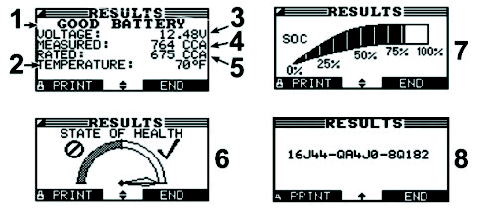
- Battery test result
- Temperature
- Measured voltage
- Measured current
- Rated current
- State of health
- Charge state
- Test code
Only on the Midtronics GRX 3228 FCA
The instrument automatically proceeds sequentially to:
- Charge state check
- Charge (if necessary)
- Final check after recharging
While charging, the following parameters are displayed:
- Charging voltage
- Charging current
- Remaining charge time
- Charge amount supplied to the battery in Ah
At the end of the test, the display shows the result (Fig. 4); it is possible to scroll through the screens using the UP and DOWN arrows.
- To print the results, press the PRINT function key
- To return to the Main menu, press the EXIT function key
Fig. 4 - Battery check result on the GRX 3228 FCA
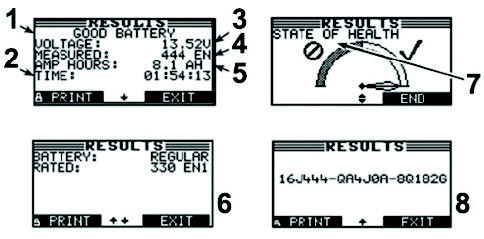
- Battery test result
- Total charging time
- Measured voltage
- Measured current
- Charging current
- Rated battery data
- State of health
- Test code
TEST RESULT AND REPAIR OPERATIONS
Depending on the test results, perform the operations in the table below:
| MIDTRONICS READING | OPERATION |
|---|---|
| Good battery | No Operation |
| Recharge battery (EXP 813 FCA only) | Completely recharge the battery using the instruments recommended by FCA and then perform the diagnosis again. |
| Charge and Retest (EXP 813 FCA only) | Completely recharge the battery using the instruments recommended by FCA and then perform the diagnosis again. |
| Change battery | Replace the battery with a new one, referring to the spare parts catalogue for the specific chassis. |
| Faulty cell | Replace the battery with a new one, referring to the spare parts catalogue for the specific chassis. |
| Battery too hot (GRX 3228 FCA only) | Leave the battery to cool down and then perform the diagnosis again. |
| Frozen battery | Leave the battery to thaw and then perform the diagnosis again. |
If the test results confirm the need to replace the battery, a test MUST be performed on the new battery, to ensure optimal charge conditions.