Radio Symptom Based Guided Diagnostic (08-074-19)
WARNING: This page is about the Voyager L, Gas, which is a different variant/trim than selected.
Publication date: 2024-06-28Reference number: 08-074-19
RADIO SYMPTOM BASED GUIDED DIAGNOSTIC
TECHNICAL SERVICE BULLETIN
Reference Number(s): 08-074-19, Date of Issue:
June 28, 2024
| CHRYSLER: | 2018 - Current (ALL) (Fiat Chrysler Automobiles (FCA) Group |
| GROUP: | 08 - Electrical |
NOTE:
This bulletin is supplied as technical information only and is not an authorization for repair. No part of this publication may be reproduced, stored in a retrieval system, or transmitted, in any form or by any means, electronic, mechanical, photocopying, or otherwise, without written permission of FCA US LLC.
OVERVIEW
This bulletin provides information regarding the new wiTECH feature, Radio Symptom Based Guided Diagnostic.
MODELS
MODELS CHART
| 2018 - Current | (ALL) | (Fiat Chrysler Automobiles (FCA) Group |
NOTE:
This bulletin applies to vehicles within the following markets/countries: North America (U.S. and Canada Only).
NOTE:
This bulletin applies to vehicles equipped with one of the following radios:
- Uconnect 3 with 5" Display (Sales Codes UAA or UCA).
- Uconnect 4 with 7" Display (Sales Codes UAG, or UCG).
- Uconnect 4 with 8.4" Display (Sales Codes UAM or UcM,).
- Uconnect 4C with 8.4" Display (Sales Codes UAR, UCR, UAS or UCS).
- Uconnect 4C NAV with 8.4" Display (Sales Codes UAV, UCV, UAQ or UCQ).
- Uconnect 12.0 with Navigation radio (Sales Codes UAX or UCX).
DISCUSSION
The new wiTECH "Radio Symptom Based Guided Diagnostic" routine will assist the technician when diagnosing many radio issues. The feature will give recommendation for diagnosis and repairs on specific vehicle and radios issues.
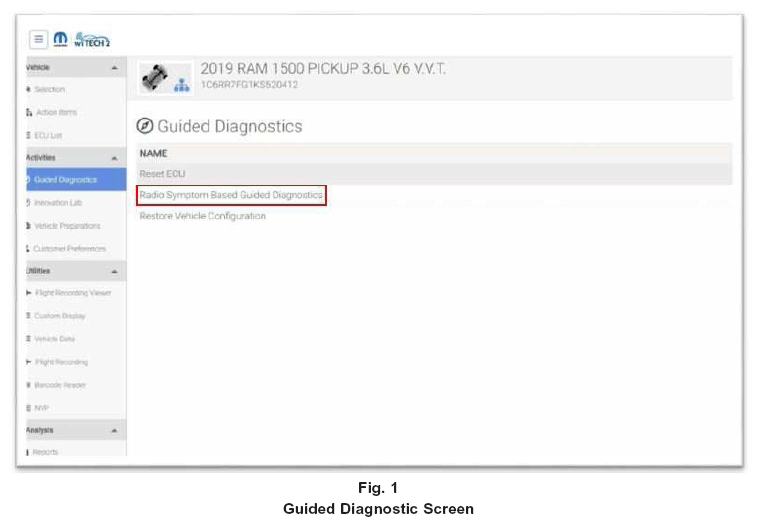
- On the left side of the Topology screen, select "Guided Diagnostics" and then select "Radio Symptom Based Guided Diagnostics" (Fig. 1
).
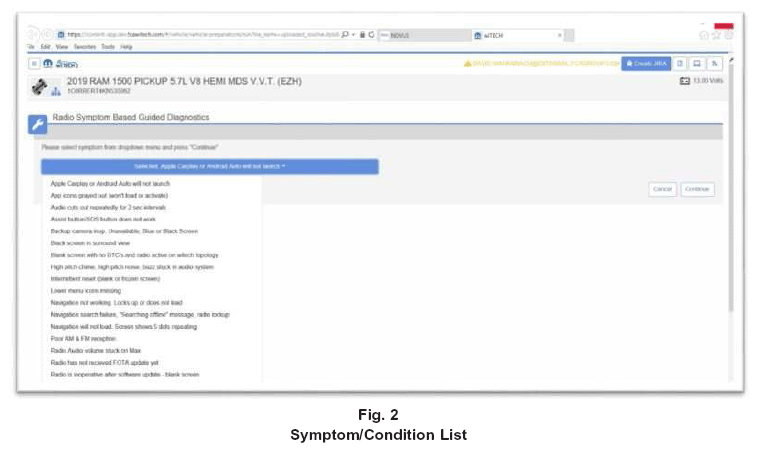
- A list of specific symptom/conditions will be displayed. Select the customer's symptom/condition (Fig. 2
).
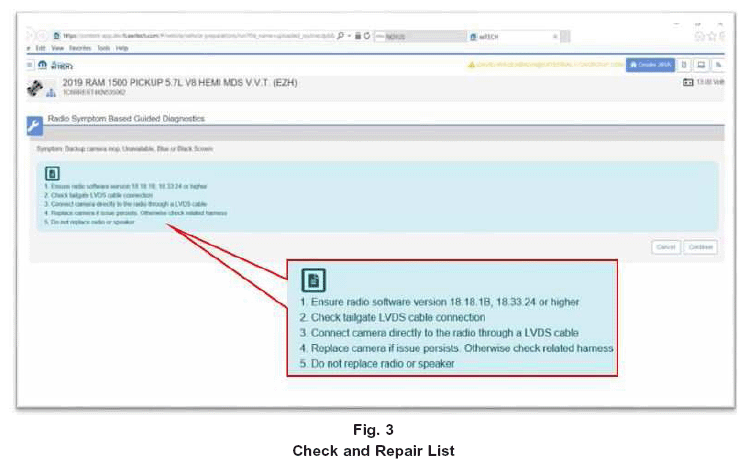
- Recommended diagnosis and repairs will be shown (Fig. 3
)NOTE: For additional diagnostic support, contact the STAR center.
POLICY
Information Only