With Integrated Screen
REMOVAL
- Disconnect and isolate the negative battery cable. If equipped with an Intelligent Battery Sensor (IBS), disconnect the IBS connector first before disconnecting the negative battery cable.
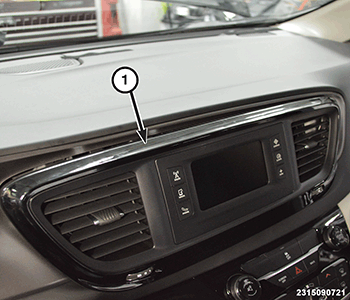
- With a suitable tool, remove the radio trim bezel (1) and disconnect the wire harness connectors.
- Remove the radio to radio bezel screws, and remove the radio from the bezel.
INSTALLATION
- Position the radio into the bezel.
- Install and securely tighten the radio to radio bezel screws.
- Carefully install the radio trim bezel (1).
- Connect the negative battery cable. If equipped with an Intelligent Battery Sensor (IBS), connect the IBS connector.NOTE:
Uconnect Access Applications and WiFi hotspot will be automatically updated in the replacement radio through the radio's embedded cellular phone based on the customers present subscription status. This update process may take up to an hour, depending upon the number of apps and adequate cellular services accessibility. The dealer is not expected to perform this process or to oversee it, but may need to explain to the vehicle owner or operator that some features and applications may not be fully restored and overall system response may be slowed until the process has completed.